Hotel Lighting Controller
- Knowledge Base
- Function Blocks
- Hotel Lighting Controller
Hotel lighting controller for dimming, switching and RGB lighting
Table of Contents
Inputs↑
| Abbreviation | Summary | Description | Value Range |
|---|---|---|---|
| I1-20 | Trigger input 1-20 for dimmer / switching input for digital circuits | 0/1 | |
| S10 | Trigger selection scene 10 | Trigger selection lighting scene 10 | 0/1 |
| S11 | Trigger seletion scene 11 | Trigger selection lighting scene 11 | 0/1 |
| S12 | Trigger seletion scene 12 | Trigger selection lighting scene 12 | 0/1 |
| S13 | Trigger seletion scene 13 | Trigger selection lighting scene 13 | 0/1 |
| R | Reset | Reset input of the hotel lighting controller | 0/1 |
| IC | Card switch | 0/1 | |
| IS | Service button | Input service button Depending on service mode | 0/1 |
| AIr | Room state | Status input 0 = 'Not booked' 1 = 'Booked' 2 = 'Guest checked in' | ∞ |
| ID | Door contact | Input door contact | 0/1 |
| DisMo | Disable motion sensor input | Disable input of the motion sensor | 0/1 |
| Mo | Motion sensor | Motion sensor input | 0/1 |
| Dis | Disable | Disable-input of the hotel lighting controller | 0/1 |
Outputs↑
| Abbreviation | Description | Value Range |
|---|---|---|
| AQ1-20 | Analog output of actuator/dimmer 1-20 | ∞ |
| AQs | Analog output currently active scene | ∞ |
| QP | Presence Output | 0/1 |
| QS | Service Output | 0/1 |
| QD | Service completed output | 0/1 |
| AQrm | Analog output for room service status | ∞ |
Parameters↑
| Abbreviation | Summary | Description | Unit | Value Range | Default Value |
|---|---|---|---|---|---|
| Rem | Remanence input | Remanence input: If active, the function block retains its previous state after a Miniserver reboot. | - | 0/1 | 0 |
| MS | Service staff mode | Input parameter - Service Staff mode 0 = Long click service button after inserting card 1 = Service button signal before inserting card 2 = Service button On before inserting card 3 = Card has to be inserted twice | - | ∞ | 2 |
| TM | Duration of Service Staff mode | Parameter - Duration for Service Staff mode | s | ∞ | 60 |
| To | Duration press and hold for 'All off' | Parameter input duration long click for 'All off' | s | ∞ | 2 |
| Tl | Timeout for leaving room | Input parameter - Timeout for leaving the room Enter 0 if no automatic off after leaving is to be triggered | s | ∞ | 60 |
| M | Max time between pulses | Parameter - Maximum duration between 2 pulses | s | ∞ | 0,35 |
| SI | Step | Parameter - Step size for dimmer in % | % | ∞ | 2 |
| ST | Step rate | Parameter - Step rate for dimmer | s | ∞ | 0,2 |
| Min | Minimum value | Parameter input minimum dimmer value (0 to 50%) | % | ∞ | 15 |
| Max | Maximum value | Parameter input maximum dimmer value (50 to 100%) | % | ∞ | 100 |
| L | Do not set last value | Parameter - do not set last dimmer value (OFF = short click sets last value when switched off) | - | 0/1 | 0 |
| TH | Duration On | Input parameter - Duration ON for motion sensor Countdown starts from falling edge of Mo | s | ∞ | 180 |
Properties↑
| Summary | Description | Default Value |
|---|---|---|
| Lighting scenes | Lighting scene management | - |
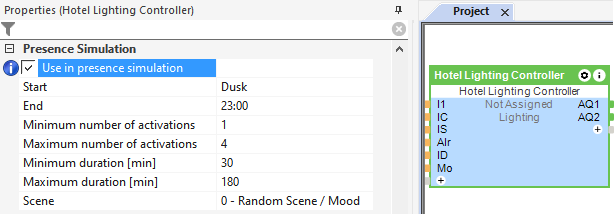
Presence Simulation↑
This function block has a presence simulation.