LED Ceiling Light RGBW Tree
- Knowledge Base
- Devices
- LED Ceiling Light RGBW Tree
The Loxone LED Ceiling Light RGBW Tree is a surface mounted 24VDC light fixture with warm white and colored light. It features an integrated motion and brightness sensor. It is connected to the Miniserver via the Loxone Tree technology.
Datasheet LED Ceiling Light RGBW Tree
Table of Contents
- Mounting
- Commissioning
- Tree Communication and Voltage Drop
- Inputs, Outputs, Properties
- Safety Instructions
- Documents
Mounting↑
Switch off the supply voltage before installation.
Mount the base plate to the ceiling. The lamp will be held to the base plate by 3 magnets.
Connect the power supply and Tree communication wires.
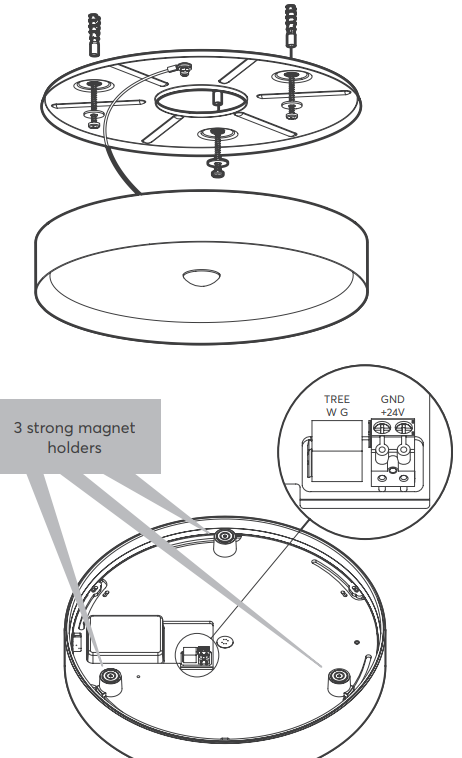
Then place the lamp on the base plate. Make sure that the magnets are positioned correctly and that no wires are jammed.
The additional safety rope is a security feature and must not be removed!
Shortly after power-up, the status LED will blink orange if the wiring is correct (connection to Tree Extension and Miniserver is established).
Commissioning↑
For lights, a commissioning mode is active when the devices are supplied with power and have not yet been paired.
In this mode, the device indicates whether it has been connected correctly and, if the connection is successful, provides lighting until it has been paired.
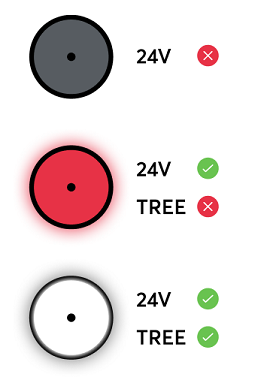
This function is supported since Loxone Config 14.0.3.28, depending on the device firmware.
Then follow the pairing procedure on the Tree Interface.
Tree Communication and Voltage Drop↑
If the current flow on the GND line results in a voltage drop too high, this potential difference also affects the tree communication.
To solve this problem, split consumers of higher power over longer distances to several supply lines, or use a supply line with a higher cross-section, or a power supply close to the consumers.
For existing installations, doubling the cross-section of the GND line is often sufficient to eliminate the potential difference.
Sensors↑
| Summary | Description | Unit | Value Range |
|---|---|---|---|
| Motion | Input is active when motion is detected | - | 0/1 |
| Brightness | Provides the measured value of the current brightness. Value is not updated when the light is on | Lx | ∞ |
Actuators↑
| Summary | Value Range |
|---|---|
| Smart Actuator | ∞ |