Nano DI Tree
- Knowledge Base
- Devices
- Nano DI Tree
The Nano DI Tree is a compact module that adds 6 digital inputs via the Loxone Tree technology.
Table of Contents
Mounting↑
Install the device in a suitable installation box.
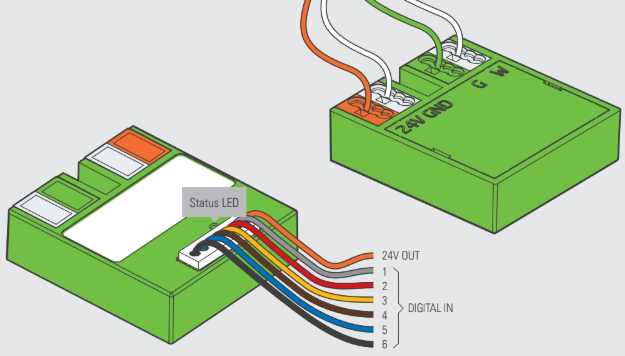
Connect the power supply (orange/white terminal) and Tree communication wires (green/white terminals). Shortly after power-up, the status LED will blink orange if the wiring is correct (connection to Tree Extension and Miniserver is established).
Commissioning↑
Then follow the pairing procedure on the Tree Interface.
Sensors↑
| Summary | Unit | Value Range |
|---|---|---|
| Input 1 | Digital | 0/1 |
| Input 2 | Digital | 0/1 |
| Input 3 | Digital | 0/1 |
| Input 4 | Digital | 0/1 |
| Input 5 | Digital | 0/1 |
| Input 6 | Digital | 0/1 |
Diagnostic Inputs↑
| Summary | Description | Unit | Value Range |
|---|---|---|---|
| Online Status Nano DI Tree | Indicates whether the device can be reached by the Miniserver. Diagnostics for Air devices Diagnostics for Tree devices Diagnostics for Extensions | Digital | 0/1 |
Properties↑
| Summary | Description | Default Value |
|---|---|---|
| Monitor online status | If checked, you will be notified via System Status or the Mailer if the device is no longer available or goes offline. | - |
| Serial number | Specifies the serial number of the device. | - |
Safety Instructions↑
The installation must be carried out by a qualified technician in accordance with all applicable regulations.
The installation requires a suitable enclosure to ensure protection against contact, water and dust.