Nano Dimmer Air US
- Knowledge Base
- Devices
- Nano Dimmer Air US
The Nano Dimmer Air US integrates LED lamps, incandescent bulbs and more into the Loxone ecosystem. Thereby they can become part of lighting moods, alarm lights, and much more. An optional plug-on module enables a variety of further control options in the Loxone system.
Table of Contents
Mounting↑
Install the device in a suitable installation box.
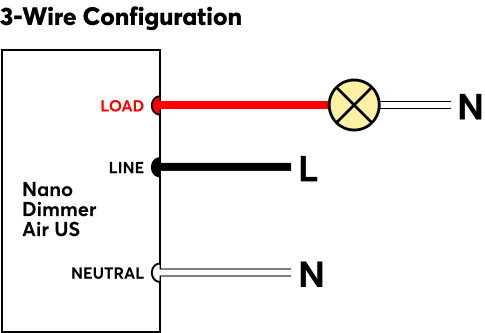
The 3-wire configuration is recommended, as it provides optimal dimming performance:
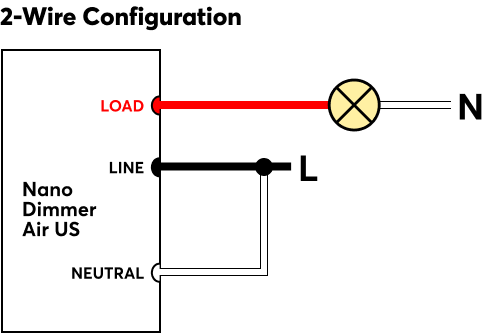
If no neutral wire (N) is available, the 2-wire configuration can be used. Please not that this method may lead to limitations in dimming performance:
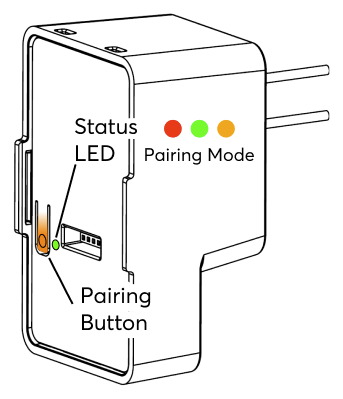
The status LED, the pairing button and the connector for the optional plug-on module are located on the front:
Commissioning↑
In delivery state, pairing mode will be active after the power supply has been established. This is indicated by the status LED flashing red/green/orange.
Then follow the pairing procedure on the Air Interface.
To activate the pairing mode manually, hold down the pairing button for at least 5 seconds after establishing power supply.
Touch for Nano↑
The optional plug-on module Touch for Nano features five touch points to control the most important functions of a room. When a button is touched, an audible click confirms the action.
The plug-on module snaps onto the Nano Dimmer Air. The assembly is then mounted to the switch/outlet box with the supplied screws.
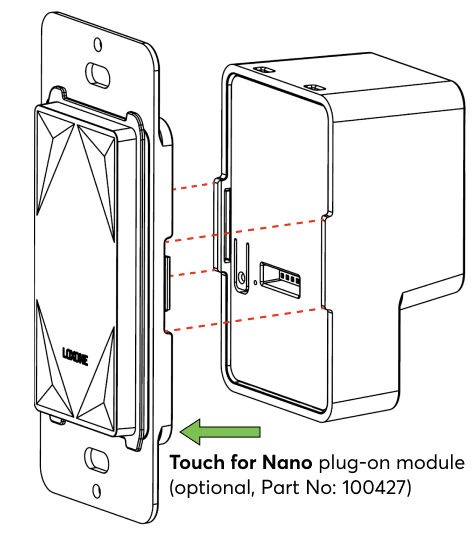
When using the Touch for Nano plug-on module, it must be activated in the properties of the Nano Dimmer Air in Loxone Config. The combined button input T5 will then be available in the peripheral tree.
| The Touch for Nano's large center touch zone is ideal for controlling the lighting, while the corner zones are suitable for controlling music and shading. It is based on the Loxone switch standard. The buttons can also be freely used for other applications. To use the individual buttons as inputs, activate the checkboxes in the Properties window. The audible confirmation can also be disabled here. |
Sensors↑
| Summary | Description | Value Range |
|---|---|---|
| T5 | Combined input for the 5 touch points according to the Loxone Switch Standard. | ∞ |