Pulse at
- Knowledge Base
- Pulse at
The Pulse at function block provides a pulse with adjustable duration.
A specific time or date can be selected in the block, as well as events such as sunrise, dusk, or hour pulse, month pulse, etc.
The time setting can be changed via the user interface.
Table of Contents
Inputs↑
| Abbreviation | Summary | Description | Value Range |
|---|---|---|---|
| Off | Off | Pulse: Outputs are reset / switched off. On: Block is locked. Dominating input. The name of the connected sensor is used in the user interface. | 0/1 |
Outputs↑
| Abbreviation | Summary | Description | Value Range |
|---|---|---|---|
| O | Output | Activates the output at the defined time, for the duration set in parameter (Don). | 0/1 |
| AC | API Connector | Intelligent API based connector. | - |
Parameters↑
| Abbreviation | Summary | Description | Unit | Value Range | Default Value |
|---|---|---|---|---|---|
| Rem | Remanence input | Remanence input: If active, the function block retains its previous state after a Miniserver reboot. | - | 0/1 | 0 |
| Don | On-duration of output (O) | s | 0...∞ | 1 |
Properties↑
| Summary | Description | Default Value |
|---|---|---|
| Pulse | Selection of when the pulse is to be output. | - |
| Time | Time at which the pulse is created | - |
| One-time pulse | One off pulse on a specific date | - |
Basic Programming↑
After adding the block, a time function can be selected in its properties.
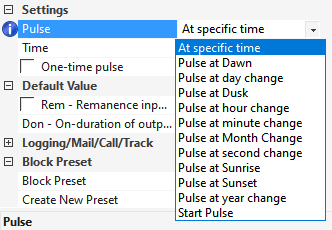
Time functions, describing an interval other than daily (e.g. Minute pulse), provide the pulse at the interval of their name.
If the option one-time pulse is selected, then a date must also be set. The pulse will then be executed only once on the set date.
This option is not available for all time functions.
In the following example, the function block is used to send a daily pulse to the Automatic Shading block to open the blinds in the morning:
