Relay Extension
- Knowledge Base
- Devices
- Relay Extension
The Relay Extension features 14 dry contact relay outputs.
Table of Contents
Commissioning↑
The Relay Extension is installed on a DIN rail in a suitable enclosure.
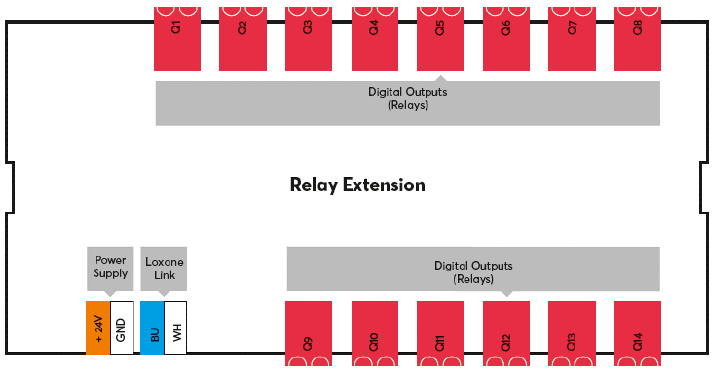
Connect the power supply and Link communication to the Miniserver.
Connect the loads to the relay terminals. For loads exceeding 12A, use a wire cross-section of 2.5mm².
| For thermal reasons the total load rating must not exceed 48A (IEC) or 45A (UL). |
The Extension starts after switching on the power supply, and the status LED will flash orange after a short time when the connection to the Miniserver is established.
Then follow the pairing procedure on the Link Interface.
Wiring examples↑
Actuators↑
| Summary | Unit | Value Range |
|---|---|---|
| Actuator (Relay) 1 | Digital | 0/1 |
| Actuator (Relay) 2 | Digital | 0/1 |
| Actuator (Relay) 3 | Digital | 0/1 |
| Actuator (Relay) 4 | Digital | 0/1 |
| Actuator (Relay) 5 | Digital | 0/1 |
| Actuator (Relay) 6 | Digital | 0/1 |
| Actuator (Relay) 7 | Digital | 0/1 |
| Actuator (Relay) 8 | Digital | 0/1 |
| Actuator (Relay) 9 | Digital | 0/1 |
| Actuator (Relay) 10 | Digital | 0/1 |
| Actuator (Relay) 11 | Digital | 0/1 |
| Actuator (Relay) 12 | Digital | 0/1 |
| Actuator (Relay) 13 | Digital | 0/1 |
| Actuator (Relay) 14 | Digital | 0/1 |
Diagnostic Inputs↑
| Summary | Description | Unit | Value Range |
|---|---|---|---|
| Online Status Relay Extension | Indicates whether the device can be reached by the Miniserver. Diagnostics for Air devices Diagnostics for Tree devices Diagnostics for Extensions | Digital | 0/1 |
| System temperature | Provides the internal device temperature. This is often the temperature of the CPU or another location in the device. | ° | ∞ |
| Temperature Shutdown | Input is active, when the outputs of the device have been switched off due to high device temperature. Possible reasons: Ambient temperature too high, outputs overloaded. | Digital | 0/1 |
Properties↑
| Summary | Description | Default Value |
|---|---|---|
| Serial number | Specifies the serial number of the device. | - |
| Monitor online status | If checked, you will be notified via System Status or the Mailer if the device is no longer available or goes offline. | - |
Safety Instructions↑
Installation must be carried out by a qualified electrician in accordance with the applicable regulations.
This device must be mounted on a DIN rail in an electrical distribution enclosure to ensure protection against contact, water and dust.