SIA DC-09
- Knowledge Base
- Function Blocks
- SIA DC-09
Using the SIA DC-09 protocol, the Miniserver can send a predefined message to a SIA server upon ON/OFF/analog value change, indicating threats such as fire alarm or burglary to a monitoring station.
An introduction to SIA DC-09 and the configuration in Loxone Config is available in this video on YouTube.
| The Miniserver Gen. 1 does not support the SIA DC-09 protocol! |
Table of Contents
Properties↑
| Summary | Description | Value Range | Default Value |
|---|---|---|---|
| Server address | IP-address:port or sia.example.com:port | - | - |
| Backup server address | IP-address:port or sia.example.com:port If specified, this server is used when the main server is not available. | - | - |
| Polling [s] | Server address polling [s] (0 = no polling, max. 86400 seconds) | 0...86400 | - |
| Backup polling [s] | Backup server address polling [s] (0 = no polling, max. 86400 seconds) | 0...86400 | - |
| Server timeout [s] | Timeout [s] for server response (1 to 10 seconds) | 1...10 | - |
| Protocol | IP protocol currently only TCP is supported | - | - |
| Data format | Protocol (expected by the server) | - | - |
| Encryption Key | 0, 32, 48, or 64 characters (allowed characters: 0-9 A-F) If no key is specified, the transmission is unencrypted | - | - |
| Account Number | Server account (3-16 characters allowed: 0-9 A-F) | - | - |
| Account prefix | Prefix to account (1-6 characters allowed: 0-9 A-F) Use 0 if none is specified. | - | - |
| Receiver number | optional receiver number (0-6 characters allowed: 0-9 A-F) | - | - |
Programming example↑
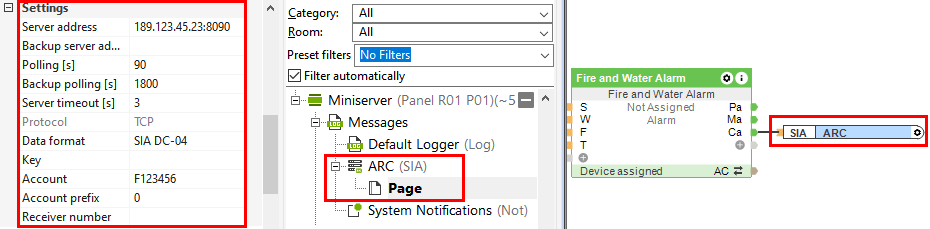
First, create a SIA DC-09 output under Messages:

Now the SIA server address must be specified in the settings.
SIA Codes, Contact ID Codes↑
For further information on the protocol structure and the SIA codes, see the following documents:
List of Contact ID Codes: www.nexgenerationcentral.com/Portals/7/AdemcoContactID.pdf