Touch Pure Air
- Knowledge Base
- Devices
- Touch Pure Air
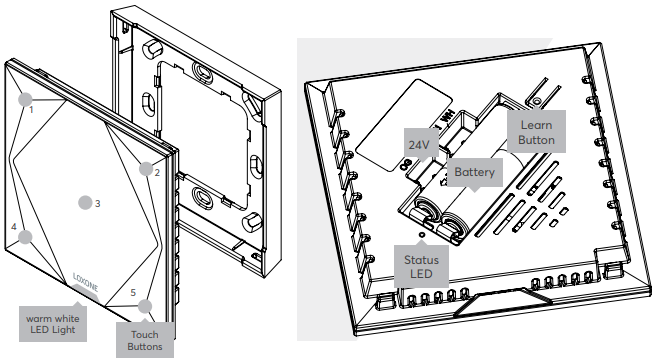
The Loxone Touch Pure Air features five touch points on a glass surface to control the most important functions of a room. When a button is touched, an audible click confirms the action.
The large center touch zone is ideal for controlling the lighting, while the corner zones are suitable for controlling music and shading. It is based on the Loxone switch standard. The buttons can also be freely used for other applications.
An integrated sensor measures temperature and relative humidity.
Please note that there is a certain delay when measuring humidity due to the housing. The Room Comfort Sensor is better suited for a fast detection of changes in humidity.
The device can be operated with two AAA batteries or with external power supply. An orientation light is also available with external power supply.
Datasheet Touch Pure Air White / Anthracite / Gold
Datasheet Touch Pure Classic Air
Table of Contents
- Mounting
- Commissioning
- Battery Replacement
- Inputs, Outputs, Properties
- Safety Instructions
- Documents
Mounting↑
Install the mounting frame at the desired location. Insert the battery or connect the power supply (orange/white terminal):
Commissioning↑
In delivery state, pairing mode will be active after inserting the battery or after the power supply has been established. This is indicated by the status LED flashing red/green/orange.
Then follow the pairing procedure on the Air Interface.
To activate the pairing mode manually, hold down the pairing button for at least 5 seconds after establishing power supply.
The available functions differ depending on whether the device is battery operated or connected to an external power supply. This is determined during pairing. The device must therefore be paired in the same supply method in which it is to be operated later.
If the supply method is changed later, the device must be deleted from the programming and paired again.
Battery Replacement↑
To replace the batteries, remove the Touch Pure Air from the wall. Two AAA batteries are located in the back. Remove the batteries and insert new ones. The device will restart and the status LED will flash green 3 times. In case the LED does not blink at all or is permanently (faintly) red, the batteries are empty. Note: The LED is off during normal operation.
Sensors↑
| Summary | Description | Unit | Value Range |
|---|---|---|---|
| T5 | Combined input for the 5 touch points according to the Loxone Switch Standard. | - | ∞ |
| Temperature | Provides the measured value of the current temperature | ° | ∞ |
| Air humidity | Provides the measured value of the current air humidity | % | ∞ |