Water Sensor Air
- Knowledge Base
- Devices
- Water Sensor Air
The Loxone Water Sensor Air is a wireless sensor with two contacts on the bottom. The sensor activates when the contacts come into contact with a conductive liquid. This allows monitoring of indoor water intrusion or leakage.
Datasheet Water Sensor Air Gen.1
Table of Contents
- Commissioning
- Assembly
- Battery Replacement
- Inputs, Outputs, Properties
- Safety Instructions
- Documents
Commissioning↑
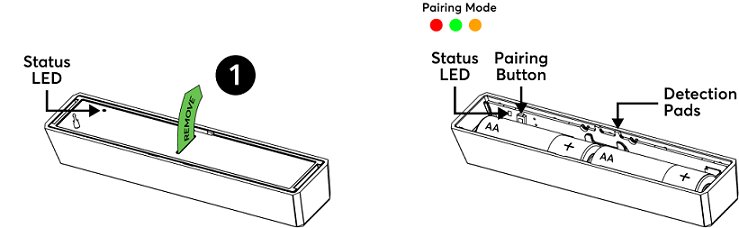
In delivery state, pairing mode will be active after removing the battery pull tab. This is indicated by the status LED flashing red/green/orange.
Then follow the pairing procedure on the Air Interface.
To activate the pairing mode manually, hold down the pairing button for at least 5 seconds after establishing power supply.
Assembly↑
Position the Water Sensor Air at the desired location.
| If the sensor was submerged in water, it will no longer operate and must be replaced by a new sensor. When installing the sensor, make sure that it is not subjected to water in everyday use, for example when cleaning the floor. |
| When mounted to metallic surfaces, the range may be significantly reduced. |
Battery Replacement↑
Use a screwdriver to open the cover on the back and remove the two AA batteries.
After inserting the new batteries, the device will automatically restart, and the status LED will blink green three times.
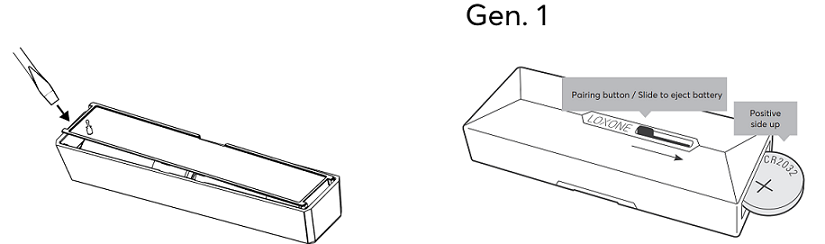
Gen.1: Use the white button to eject the battery. Insert a new CR2032 lithium battery and ensure it is completely pushed in for proper button operation.
| Devices with serial number 504F94FFFE-B/C..... do not flash their LED after removing and reinserting the battery. For such devices, after removing the battery, either press a button or wait for a minute to display the status after reinserting the battery. |
Sensors↑
| Summary | Description | Value Range |
|---|---|---|
| Input 1 | To use the pairing button as Input | 0/1 |
| Contact | Input is active when water is detected | 0/1 |